Use J.CW. ENTERTAINMENT IPTV Service On IOS
iPhone & iPad Use
Download the app from the App Store (it requires iOS 9.0 or later and is compatible with iPhone, iPad, and iPod touch).
247 IPTV Player on the App Store WHMCS SMARTERS PRO
https://apps.apple.com/in/app/iptv-smarters-pro-live-vod/id6478442199
Also, use your username and password that were sent to you
When you signed up for a subscription.
When you signed up for a subscription.
Playlist
Playlist URL:-
http://ky-iptv.com:25461/get.php?username=yourusername&password=yourpassword&type=m3u_plus&output=mpegts for m3u
EPG Electronic Program Guide is EPG URL:-
Also, the Portal URL For WHMCS SMARTERS LIGHT APP
This goes at the bottom http:
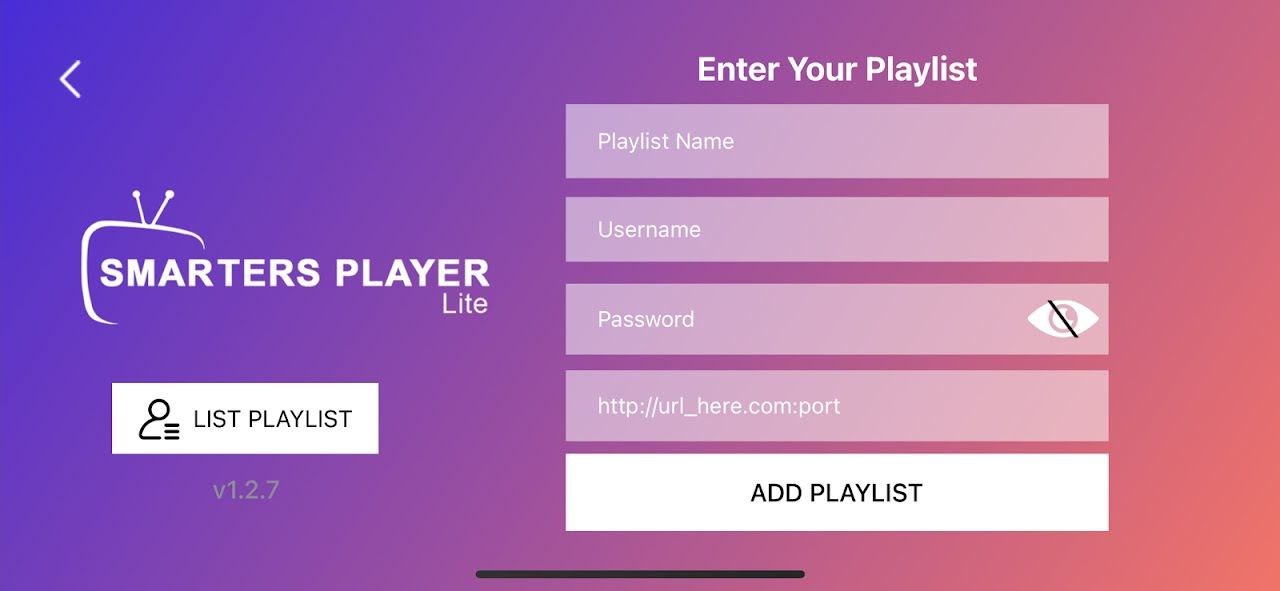
1. Play list name anything you want
2. your username sent to you when you signed up
3. your password sent to you when you signed up
4. PORTAL URL is http://kytv.xyz:25461
IMPORTANT: After this you can cast the movies or anything your watching on the IPHONE to your tv as long as you are both on the sam WIFI